
This is the top 10 most used websites that are often found in my classroom. A web2.0 teachers toolkit if you will. Since making Planning Heaven I am constantly finding new exciting and innovative sites but these are my main 10 at the moment. I am going to start blogging and tweeting more top 10 lists of various web technologies and apps.
1)
Google
Drive
This is a fantastic website that allows you to store your
files online. It is very cheap and free if you only have the basic 5GB plan
(more than enough for most). You can easily download files from anywhere to any
device and you cans send links of your files to other people. It links very
well with google docs so you can collaborate on documents with others. All in
all it is a fantastic free service that I have got all my a-level students to
sign up to and no-one has yet missed a deadline (fingers crossed!)

2)
Academic
Earth
Academic Earth aims to provide everyone with the opportunity
to earn a world-class education by offering free online classes and online
learning tools. It is essentially a little like youtube only offering free
videos of some of the worlds best lectures form some of the best universities.
Essentially offering a free quality education to anyone that seeks it.

3)
Poll
Everywhere
This website allows you to do class polls with your students
using their mobiles phones and texting answers in. The results appear on screen
and with most networks have free or unlimited text messages on even their pay
as you go plans this could be a valuable classroom tool.

4)
Prezi
Prezi is an online application that allows you to create
innovative, interactive multimedia presentations. You can easily create a
fantastic, professional looking presentation. I have found that students love
to use it and also seem more focused on my presentations if they are in prezi
form.

5)
Code
Academy
I love this site. It is a great way to introduce programming
languages such as JAVA, Python and HTML. No software is needed and there are
easy to follow tutorials. I have never come across software like it and its
completely free. From an ICT teachers perspective its great! It would also be
great for anyone that wants to learn in their own time.

6)
Class
Dojo
"ClassDojo improves behavior in class with just one
click of a smartphone, laptop, or tablet. It also automatically logs data and
creates student behavior reports so you never have to do any data entry."
One of my teacher friends is a big advocate of Class Dojo and I must admit, he
doesn't really have any behavior issues so the students must respond to it.

7)
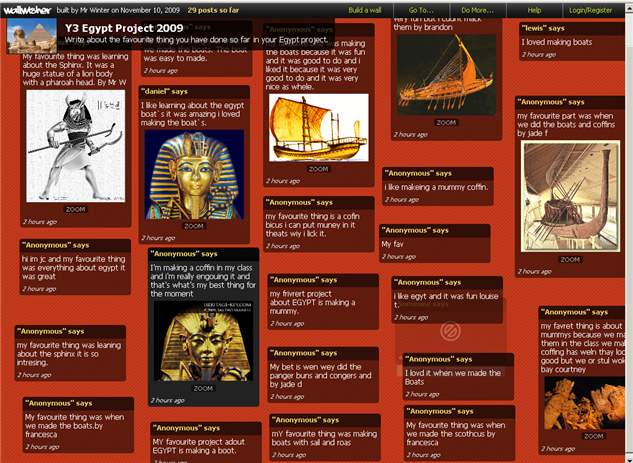
Wallwisher
Wallwisher allows you to use your computer like a notice
board. You can create multiple 'boards' and anybody you give the URL to can add
to the board. As an ICT teacher I use this for plenaries in my lessons and get
students to log onto my board and post comments on the lesson. My screen at the
front then displays all of the comments that the students have made. I can even
save a picture of the finished article and email it to my students for
reference. Create notes in your own workspace wall. You can save your workspace
at any time and return to them from the same computer or any other computer.
You can also share your notes with others by providing the workspace name (or
url) to a friend. Great for collaborative ideas and brainstorming as many
people can work on the same page at the same time.
8)
Screencast-o-matic
Screencast-o-matic is a website that allows you to create
videos by recording whatever is on your screen. You don’t need to download any
software and it is a great way for teachers and students to create tutorial
videos, research projects or to complete homework.

9)
Kahn
Academy
Kahn Academy is one of the most highly rated web
technologies that I know of. It is used by a lot of teachers I know and they
all can't speak highly enough of it. A great collection of math, science, and
finance lectures and quizzes to supplement their classroom materials. Even
though I am an ICT teacher I still use the site to introduce some mathematical concepts
to my A-level students.

10) Voki
This is a great website where you can have an avatar
(computer generated character) speak any text that you input. This is a
creative way present information and could be useful to both teachers and
students. I use it to create quizzes for my students. So instead of me reading
the questions they can have a computer animated Mr T!


